 Zhongye

2026-01-22-GitHub Action 自动同步博客到 GitHub 主页
只要博客支持 RSS 输出(通常为 rss.xml 或 atom.xml),通过使用 blog-post-workflow 这个 GitHub Action,即可实现每当博客更新时,GitHub 主页会自动抓取并生成文章列表,来展示开发者的活跃度与技术积累。
基础介绍和使用步骤
主要围绕这个项目来展开: https://github.com/marketplace/actions/blog-post-workflow
进入自己的仓库,在 README.md 文件中添加以下片段,您可以自定义标题,但必须包含以下注释标记,工作流会将该标记替换为实际的博客文章列表:
# 博客文章
<!-- BLOG-POST-LIST:START --><!-- BLOG-POST-LIST:END -->在仓库根目录下创建文件夹 .github,并在其中创建 workflows 子文件夹(如果不存在)
在 workflows 文件夹内创建新文件 blog-post-workflow.yml:
name: Latest blog post workflow
on: schedule: # 定时自动运行 - cron: '0 0 * * *' # 每天 UTC 00:00 执行一次 workflow_dispatch: # 支持手动触发(在 GitHub Actions 页面直接运行)
permissions: contents: write # 允许向 README 写入生成的内容
jobs: update-readme-with-blog: name: Update this repo's README with latest blog posts runs-on: ubuntu-latest steps: - name: Checkout uses: actions/checkout@v4
- name: Pull in dev.to posts uses: gautamkrishnar/blog-post-workflow@v1 with: feed_list: "https://dev.to/feed/gautamkrishnar,https://www.gautamkrishnar.com/feed/"将上面的 feed_list 中的示例 URL 替换为您自己的 RSS 订阅源地址。可参考 常用来源列表。提交更改。
关于执行频率的说明: 默认设置为每天 UTC 00:00 执行一次,适合绝大多数用户。您可根据自己的发文频率调整计划任务:
- 每日:cron: ‘0 0 * * *’ (大多数人推荐)
- 每周:cron: ‘0 0 * * 0’ (每周日 UTC 00:00)
- 每月:cron: ‘0 0 1 * *’ (每月1日 UTC 00:00)
过于频繁的调度(例如每小时)通常没有必要,除非您发布非常频繁。任何时候您都可以通过 workflow_dispatch 手动触发执行。
进入仓库「Settings → Actions → General」,将「Workflow permissions」设置为「Read and write permissions」,然后保存。
配置
| 参数 | 默认值 | 说明 | 必填 |
|---|---|---|---|
| feed_list | "" | RSS 订阅源地址列表,用逗号分隔,例如:https://example1.com/feed,https://example2.com/rss.xml | 是 |
| max_post_count | 5 | 显示的最大文章数量(所有订阅源合并计算) | 否 |
| readme_path | ./README.md | 要更新的 README 文件路径(支持多个路径,用逗号分隔) | 否 |
| gh_token | 自动使用 GitHub token | 用于提交更改的 token(需具备 repo 权限) | 否 |
| comment_tag_name | BLOG-POST-LIST | 自定义起始/结束注释标记名称(用于在同一仓库显示多组列表) | 否 |
| disable_sort | false | 是否禁用按发布日期排序 | 否 |
| sort_order | desc | 排序方向(asc = 升序最旧在前,desc = 降序最新在前),仅当 disable_sort=false 时有效 | 否 |
| reverse_order | false | 当 disable_sort=true 时是否反转列表顺序 | 否 |
| feed_names | "" | 与 feed_list 对应的订阅源名称列表,用于模板中显示源名称,例如:博客,Dev.to | 否 |
| template | default | 自定义文章列表的输出格式,支持多种变量(详见下文) | 否 |
| categories_template | default | 自定义分类(categories)的显示格式 | 否 |
| date_format | UTC | 使用 $date 变量时的日期格式(基于 dateformat 库) | 否 |
| user_agent | rss-parser | 抓取 RSS 时使用的 User-Agent | 否 |
| accept_header | application/rss+xml | HTTP 请求的 Accept 头 | 否 |
| filter_comments | stackoverflow/Comment by $ author/,stackexchange/Comment by $ author/ | 启用特定平台的评论过滤(目前支持 Stack Overflow / Stack Exchange) | 否 |
| custom_tags | "" | 提取 RSS 中的自定义标签并映射为模板变量 | 否 |
| title_max_length | "" | 标题最大长度,超长部分显示省略号 … | 否 |
| description_max_length | "" | 描述最大长度,超长部分显示省略号 … | 否 |
| commit_message | Updated with the latest blog posts | 自定义提交信息 | 否 |
| committer_username | blog-post-bot | 提交者的用户名 | 否 |
| committer_email | blog-post-bot@example.com | 提交者的邮箱 | 否 |
| enable_keepalive | true | 是否自动进行 dummy commit 以防止仓库因长时间无活动而被 GitHub 停止 cron 触发 | 否 |
| remove_duplicates | false | 是否根据标题去除多源重复文章 | 否 |
| filter_dates | "" | 按时间范围过滤文章(例如 daysAgo/30/ 只显示最近30天、currentMonth 只显示本月) | 否 |
template 常用变量(在 template 参数中使用):
- $title — 文章标题
- $url — 文章链接
- $description — 文章摘要/描述
- $date — 发布日期(格式由 date_format 控制)
- $feedName — 订阅源名称(需配合 feed_names 使用)
- $categories — 文章分类(逗号分隔)
- $counter — 序号
- $newline — 换行
- $randomEmoji(💯,🔥,🚀) — 随机表情
- $emojiKey(💯,🔥,🚀) — 按顺序循环的表情
示例模板:[$counter] [$title]($url) $date $newline
如需更高级的自定义参考官方仓库的 Advanced usage
个人配置分享
分享一下个人配置,效果展示如下:
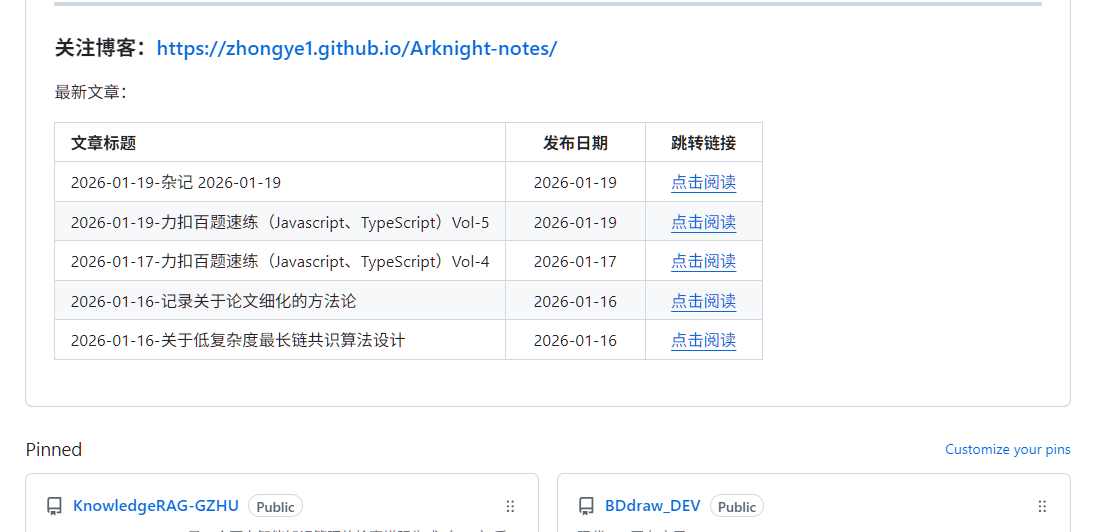
工作流配置
name: Latest blog posts
on: workflow_dispatch: schedule: - cron: "0 0 * * *"
permissions: contents: write
jobs: update-readme-with-blog: name: Update README with latest blog articles runs-on: ubuntu-latest steps: - name: Checkout repository uses: actions/checkout@v4
- name: Pull latest articles uses: gautamkrishnar/blog-post-workflow@v1 with: feed_list: "https://zhongye1.github.io/Arknight-notes/rss.xml" max_post_count: 5 # 日期格式(yyyy为年,MM为月,dd为日) date_format: "yyyy-mm-dd" # 显式指定变量,并加上 $newline 确保换行 # 使用单引号包裹整个模板,防止 HTML 标签与 YAML 冲突 template: '<tr><td>$title</td><td align="center">$date</td><td align="center"><a href="$url">点击阅读</a></td></tr>$newline' commit_message: "chore: update latest blog articles"主页README.md配置
### 关注博客:https://zhongye1.github.io/Arknight-notes/
最新文章:
<table> <thead> <tr> <th align="left">文章标题</th> <th align="center" width="120px">发布日期</th> <th align="center" width="100px">跳转链接</th> </tr> </thead> <tbody><!-- BLOG-POST-LIST:START --><!-- BLOG-POST-LIST:END --> </tbody></table>分享到社交平台
将本文分享给你的朋友们
评论
音乐
暂无播放